ChevyParts
My Garage
My Account
Cart
OEM 2004 Chevrolet Malibu Rack And Pinion
Steering Rack And Pinion- Select Vehicle by Model
- Select Vehicle by VIN
Select Vehicle by Model
orMake
Model
Year
Select Vehicle by VIN
For the most accurate results, select vehicle by your VIN (Vehicle Identification Number).
1 Rack And Pinion found
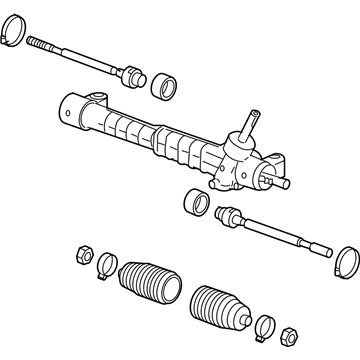
2004 Chevrolet Malibu Steering Gear Part Number: 19303500
Product Specifications- Other Name: Gear, Steering; Gear Assembly
- Replaces: 15216791, 22687087, 15858368, 25902150, 21998461
- Item Weight: 18.60 Pounds
- Item Dimensions: 53.2 x 6.1 x 8.3 inches
- Condition: New
- Fitment Type: Direct Replacement
- SKU: 19303500
- Warranty: This genuine part is guaranteed by GM's factory warranty.
2004 Chevrolet Malibu Rack And Pinion
With a comprehensive array of OEM 2004 Chevrolet Malibu Rack And Pinion, from fuel pumps to door handles, our website is a one-stop-shop for your needs. All our genuine 2004 Chevrolet Malibu Rack And Pinion are backed by the manufacturer's warranty and are offered at competitive prices in the market. Rest assured, you can shop with complete confidence.
2004 Chevrolet Malibu Rack And Pinion Parts and Q&A
- Q: How to Replace the Front Rack and Pinion Steering Gear on 2004 Chevrolet Malibu?A: Start your Rack And Pinion replacement by aligning the Steering Wheel to straight ahead then unlocking the ignition. After lifting the vehicle in position you should remove the front tires and wheels from the frame. Disassemble the intermediate shaft to Rack And Pinion pinch bolt (N/A) before disposing of the bolt but keep the intermediate shaft from rotating after separating from the Rack And Pinion. Start by separating the intermediate shaft from the Rack And Pinion while marking its correct alignment for reinstalling. Then remove the outer Tie Rod End from the Steering Knuckle. Extract the Rack And Pinion through the vehicle's left side by rotating it 90 degrees to pass the rear transmission mount. During Rack And Pinion replacement both outer tie rod ends should be detached. The first step for installation involves fitting outer tie rod ends to the Rack And Pinion before setting the Rack And Pinion into position while making necessary rotations to clear the rear transmission mount. Fasten the Rack And Pinion into frame bolts by tightening them to 70 nm (52 ft. Lbs.) while scheduling an additional 90 degrees of torque. Fasten the intermediate steering shaft to the Rack And Pinion following disassembly procedures while installing the new shaft to the Rack And Pinion using the pinch bolt (N/A), torque it at 49 nm (36 ft. Lbs.). After connecting the outer tie rod ends to the Steering Knuckle you should reinstall the front tires and wheels before inspecting the vehicle for alignment issues.
Related 2004 Chevrolet Malibu Parts
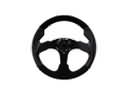 2004 Chevrolet Malibu Steering Wheel
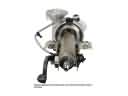 2004 Chevrolet Malibu Steering Column
 2004 Chevrolet Malibu Tie Rod
 2004 Chevrolet Malibu Ignition Lock Assembly
 2004 Chevrolet Malibu Ignition Lock Cylinder
 2004 Chevrolet Malibu Rack and Pinion Boot
 2004 Chevrolet Malibu Steering Column Cover
 2004 Chevrolet Malibu Steering Shaft
 2004 Chevrolet Malibu Tie Rod End